A blue ring flickers once across the fabric rim on your kitchen counter, spinning like a lighthouse beam before settling back into slate-gray darkness. The room is quiet. The dishwasher hums its low rhythm, water settles in the pipes, and you finish a quiet late-evening conversation about bills or an upcoming doctor visit. To your eyes, the small disc resting beside the fruit bowl is entirely dormant, an inert hockey puck of plastic and woven mesh waiting politely for a wake word.
Yet across the digital expanse, your ambient syllables have already been sliced into milliseconds of sound. Digital acoustic profiles linger on remote server stacks long after the air in your kitchen goes completely still.
Most people assume ambient devices operate like light switches, dormant until clicked. In real life, smart speakers run an unbroken acoustic loop. They monitor room reflections to filter speech from television noise, but when a faint syllable resembles their call name, the gates swing wide. What follows isn’t just local parsing; it is an automatic upload of everything spoken during that momentary spike, cataloged in an endless timeline tied directly to your billing account.
The Phantom Stenographer Behind the Drapes
Consider your smart speaker not as a helpful appliance, but as an extraordinarily obedient stenographer standing quietly in the corner of your bedroom. If you hand that stenographer an infinite pad of paper and never explicitly tell them to put their pencil down, they will write down every muttered secret, every bedroom disagreement, and every accidental trigger word forever.
Hardware manufacturers frame this archival habit as a courtesy. They claim that holding years of your voice samples helps neural networks adapt to your particular regional cadence, the cadence of your children, or the background hum of your ventilation. But this continuous voice retention turns your domestic life into an uncurated training library. Your home’s acoustic privacy is quietly traded away for microscopic gains in synthetic voice recognition.
The critical realization is simple: your speaker does not need permanent audio archives to set a five-minute pasta timer or turn off the hallway sconce. The natural language processing required to parse an instruction happens in a split second. The storage that happens afterward is purely corporate inventory, retained simply because you left the factory warehouse doors unlocked.
- Galaxy camera settings strip aggressive digital sharpening to rescue grainy evening photos
- Coffee shop Wi-Fi networks intercept unencrypted login tabs without private DNS toggles
- Dual monitor arms eliminate hunched neck stiffness and clear tangled desk cables
- Amazon Renewed phones conceal dead display pixels behind swift initial boot screens
- Whoop 4.0 bands skew sleep statistics when greasy grime clouds optical sensors
Marcus Vance, a forty-one-year-old audio forensic consultant based outside Raleigh, discovered this boundary failure firsthand while calibrating studio room acoustics in his home. Running a localized packet analyzer across his residential subnet, he watched his third-generation bedside unit push a four-second audio burst to an external IP address in the middle of a private phone call—without the wake ring ever illuminating. When he logged into his developer console, he found raw audio recordings stretching back four years, including childhood laughter, medical consultations, and fragments of intimate late-night arguments preserved in crisp, uncompressed fidelity.
Acoustic Profiles: Auditing by Living Space
Not every room demands the same acoustic posture. A speaker placed in a noisy, central area poses different risks than one sitting within arm’s reach of your pillow.
The Bedside Sanctuary
Bedrooms contain our most unguarded moments: half-asleep conversations, quiet vulnerabilities, and morning grogginess. Leaving audio history active on a nightstand unit is an unnecessary exposure. In this space, ambient audio retention should be completely severed, and physical microphone disconnect switches should become part of your regular nighttime routine.
The Living Room and Kitchen Commons
In high-traffic family zones, speakers routinely capture third-party visitors, visiting relatives, and television dialogue that sounds vaguely like a wake command. Unchecked ambient capture loops log guests without their consent. Here, turning off storage permissions prevents your profile from building tangled acoustic dossiers on everyone who steps through your front door.
The Executive Home Office
If you take confidential client calls, negotiate contracts, or handle proprietary files, a speaker archiving room audio represents a compliance nightmare. In an office setting, audio history should not merely be cleared; automated deletion routines should wipe any temporary cache immediately after each command executes.
Mindful Application: The Three-Minute Privacy Reclamation
Reclaiming control does not require unplugging your equipment or throwing your gadgets into an e-waste bin. It simply requires navigating past the layers of deliberate design friction that protect corporate data collection.
Grab your smartphone and follow this exact sequence to wipe your stored voice footprint and cut off human review access at the root:
- Open the companion app and tap More in the lower navigation tray, then select Settings.
- Scroll down to select Alexa Privacy, then tap Manage Your Alexa Data.
- Locate the section labeled Help improve Alexa.
- Switch the primary toggle next to Use of voice recordings to the Off position. This instantly stops human contractors and internal training algorithms from listening to your raw voice snippets.
- Return to the previous screen and select Review Voice History.
- Under Displaying results for, change the filter dropdown to All History.
- Tap the highlighted blue link that reads Delete all my recordings and confirm your choice.
- Select Choose how long to save recordings and mark the radio button labeled Don’t save recordings.
By switching that final setting, you instruct the system to overwrite speech snippets immediately after the command executes on the server. Your devices continue to set alarms, play music, and control smart switches without missing a beat, but the permanent acoustic log stops existing.
The Tactile Toolkit
Beyond app settings, true digital hygiene pairs software toggles with physical awareness:
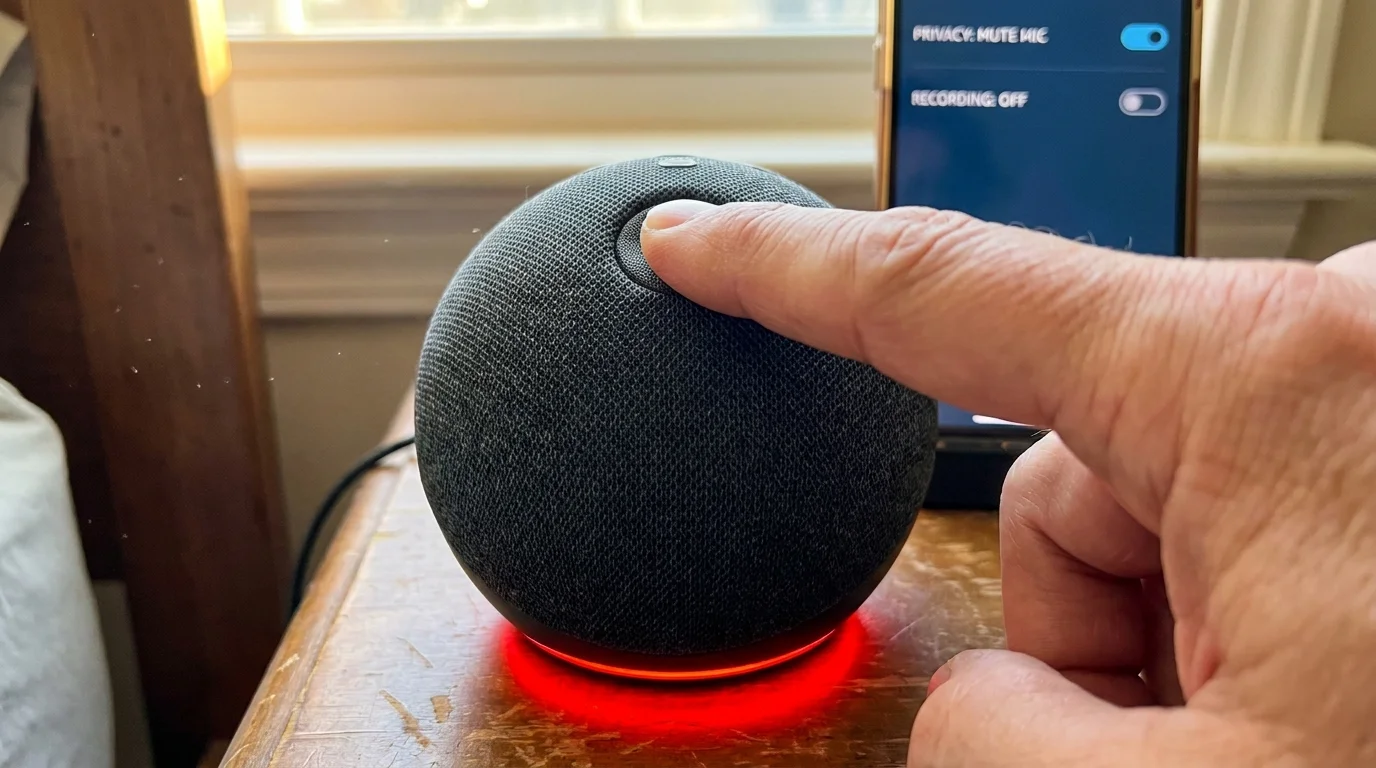
- The Hardware Kill-Switch: When the physical microphone button on top of the unit is pressed, an analog circuit disconnects power to the microphone array. The red ring indicates the microphones are physically dead, not just muted in software.
- Airflow and Placement: Keep devices at least four feet away from televisions and soundbars. This simple physical distance prevents acoustic cross-talk that falsely triggers recording events.
- Routine Audit Cadence: Set a calendar reminder every six months to inspect your voice log. Firmware updates occasionally reintroduce telemetry prompts under newly minted service menus.
The Bigger Picture: Reclaiming Domestic Quietude
There is a profound psychological weight to knowing your home is not silently archiving itself. Our homes are supposed to be soft edges in a world of rigid surveillance, spaces where sentences can trail off without being transcribed, where ideas can be half-formed, and where silence belongs entirely to the people inside the room.
Taking ownership of your privacy settings isn’t an act of technological paranoia; it is an act of simple domestic self-respect. Guarding your private spaces restores your home to what it was always meant to be: an intimate haven where walls provide shelter, rather than quietly keeping notes.
The boundary between personal life and automated convenience is never drawn by the manufacturer; it is carved out by the owner who knows where the toggles hide.
| Privacy Configuration | Technical Function | Added Value for the Reader |
|---|---|---|
| Human Review Opt-Out | Revokes access for human grading teams to inspect stored speech snippets. | Ensures private family chatter never ends up on a technician’s headphones. |
| Don’t Save Recordings Toggle | Forces server-side deletion of voice tokens immediately after processing. | Reclaims domestic peace of mind without sacrificing daily voice utility. |
| Hardware Microphone Cut | Physically breaks circuit continuity to the internal MEMS microphone array. | Guarantees zero audio leakage during highly sensitive room conversations. |
Frequently Asked Questions
Will disabling voice recording storage break smart home routines or device features?
No. Your device executes timers, music streams, light switches, and question-answering identically. The only difference is that the audio token is discarded from memory once the task finishes, rather than stored permanently in your cloud profile.Why do smart speakers save audio files by default?
Manufacturers use consumer voice files to train their speech recognition and machine learning algorithms. Building massive libraries of regional accents, colloquial speech patterns, and background noises allows them to refine their models without licensing outside audio datasets.Does the red mute light mean the microphone is truly turned off?
Yes. On authentic units, the mute button controls an analog switch that cuts power to the internal microphones. Unlike soft-touch controls on some screens, this mechanical circuit break prevents audio capture at the hardware level.How often do accidental recordings occur without saying the wake word?
Academic research reveals that commercial smart speakers falsely trigger between 1.5 and 19 times per day depending on room noise and television dialogue. Any syllable sequence that mirrors the phonetic cadence of the wake word can initiate an audio upload.Can I review what my speaker has already recorded before deleting it?
Yes. In the companion app under Voice History, you can tap on individual days, see the text transcriptions, and click the play button to hear the exact audio clip that was transmitted before deciding to wipe the database clean.