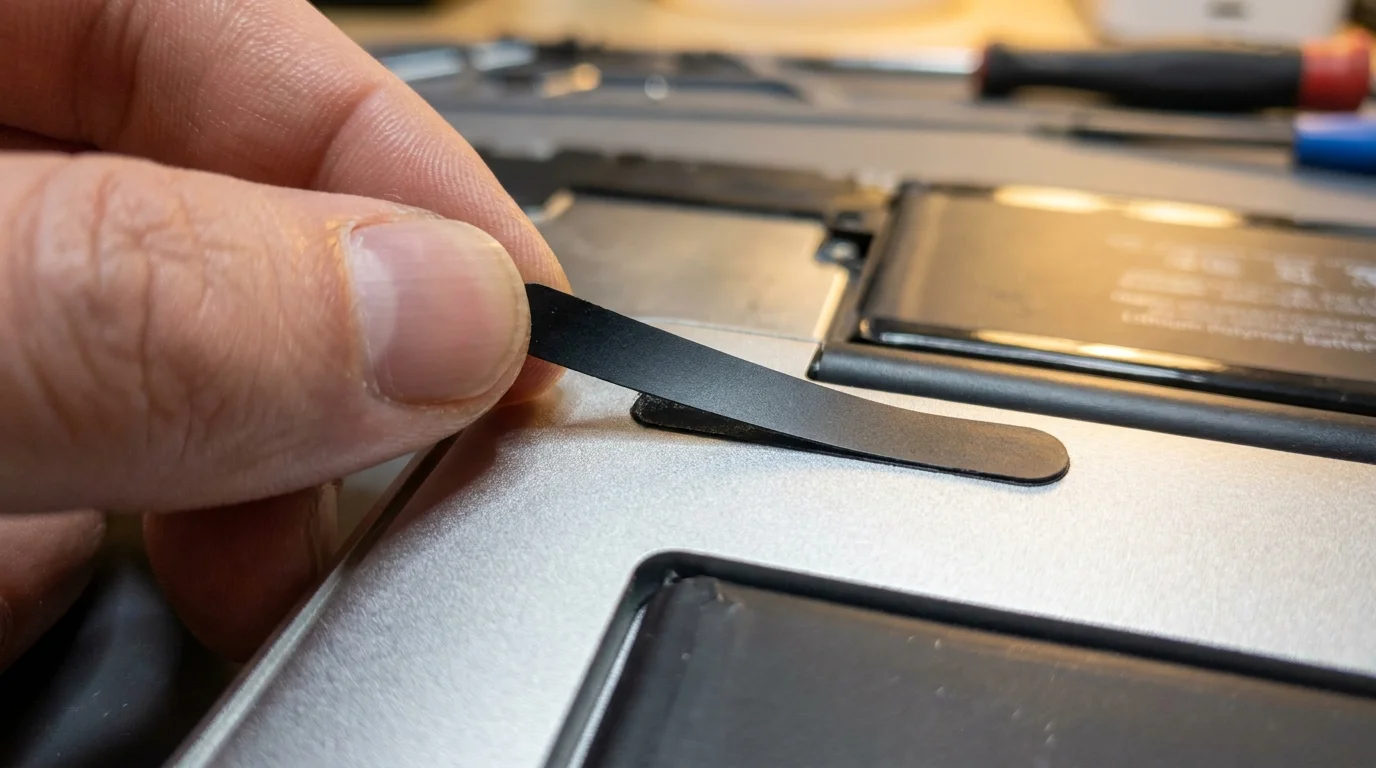
The silver aluminum underbelly of your laptop sits upside down on a soft cotton towel, cool to the touch despite hours spent running your daily life. Underneath that bead-blasted surface, thin strips of black stretch-release adhesive wait like stubborn tape under a postage stamp. You pull them slowly, feeling the rubbery tension yield millimeter by millimeter, releasing the factory-sealed cells that have carried every email, late-night draft, and streaming marathon since late 2020.
For weeks, your battery indicator has lived in a perpetual state of red-lined anxiety. The screen dims unexpectedly at 18 percent, the system status warns of service recommendations, and unplugging the power cable feels like stepping off an emotional ledge. The glossy storefront downtown tells you this machine has reached its natural twilight, gently steering you toward a brand-new M3 or M4 model with a four-figure price tag to match.
Yet nothing about your daily workflow actually stumbles on the processor. The Apple silicon architecture still boots instantly, remains whisper-silent without a fan, and handles dozens of browser tabs without breaking a sweat. The silicon engine is still young; only the chemical fuel tank has grown weary after four years of heat cycles.
Understanding this distinction is what transforms an expensive crisis into an afternoon of quiet self-reliance. When you recognize that hardware lifespan outlasts chemical storage, the manufactured pressure to replace an otherwise immaculate machine evaporates.
The Silicon Longevity Paradox
Consumer electronics marketing relies on a subtle sleight of hand: conflating chemical wear with computational obsolescence. Modern laptop batteries are consumable cushions made of lithium cobalt oxide, destined to shed capacity after seven hundred to a thousand charging cycles. The processor soldered inches away, however, is a solid-state marvel with no moving parts, capable of running complex logic for well over a decade without slowing down by a single clock cycle.
When retail technicians inspect your worn laptop, their diagnostics register chemical degradation as a symptom of a tired device. They quote an official repair cost approaching two hundred dollars, or better yet, invite you to trade the laptop in for pennies against a twelve-hundred-dollar replacement. It is an economic nudge disguised as friendly advice, designed to keep assembly lines turning rather than keeping sound tools on your desk.
Think of your machine like a vintage roadster with flat tires. You would never scrap the engine, the chassis, and the hand-stitched leather interior simply because the rubber hit its tread limit. Swapping a battery pack restores the original power delivery curve, giving you back twelve to fifteen hours of real-world endurance for the cost of a modest dinner out.
- Darktable photo software strips expensive Lightroom subscription plans without sluggish export stutter
- ChatGPT Canvas workspace tools strip messy repetitive editing into rapid split-screen text adjustments
- Intel Arrow Lake processors reveal aggressive socket redesigns forcing mandatory motherboard upgrades
- Microsoft Exchange Online routing shifts derail corporate email delivery across major regional networks
- ATF database server leaks expose sensitive personal registry records through unpatched system holes
The Workbench Realist: Marcus Vance
Marcus Vance, a forty-two-year-old independent electronics technician in Richmond, Virginia, spends his mornings working through stacks of first-generation Apple silicon laptops brought in by local teachers and writers. “Every autumn, people walk into my shop convinced their M1 is dying because the battery drains before lunchtime,” Marcus says, gently scraping residual thermal paste from a heat spreader. “In ninety-five percent of cases, the processor is functioning at peak factory efficiency. Once we drop a fresh sixty-dollar battery pack into the chassis, their jaw drops because they realize they just sidestepped a four-figure credit card charge for zero computational gain.”
Matching the Repair Strategy to Your Risk Tolerance
Every desk worker approaches hardware maintenance differently, and your choice depends on how comfortable you feel holding a pentalobe screwdriver over delicate ribbon cables.
The Pragmatic DIYer
If you have ever swapped the memory in a desktop tower or replaced the screen protector on a phone, this route delivers unbeatable value. Aftermarket replacement kits hover right around sixty dollars online, arriving with pre-cut adhesive, plastic spudgers, and magnetic driver bits. By dedicating ninety calm minutes on a quiet weekend morning, you completely bypass labor markups and reclaim your machine on your own terms.
The Independent Local Shop Advocate
If the thought of handling solvent-soaked adhesive tabs makes your palms sweat, local third-party repair shops represent the sweet spot between thrift and safety. Technicians like Marcus charge modest bench fees—often between fifty and seventy-five dollars—to handle the physical extraction. You supply the part or let them source a certified cell, coming away with a warrantied install while still keeping hundreds of dollars in your pocket compared to corporate retail pricing.
The Off-Grid Traveler
For those who run their machines in camper vans, rural retreats, or long-haul train rides, battery swaps are less about saving cash and more about maximizing remote field reliability. Installing a fresh pack restores high-amperage stability, preventing sudden system shutdowns when you export video or batch-process RAW images while working hundreds of miles away from an electrical outlet.
Mindful Restoration: The 90-Minute Pack Swap
Replacing the internal cells requires patience rather than brute force. Clear your desk completely, set down a soft mat to protect the outer aluminum shell, and approach the process with deliberate focus.
Work through the project in steady, methodical movements without rushing the adhesive release:
- Power down the machine fully and disconnect all external peripherals and charging cables.
- Remove the lower case screws using a P5 pentalobe driver, keeping them organized by position since screw lengths vary slightly across the chassis perimeter.
- Disconnect the main battery power connector from the logic board first to ensure zero residual voltage flows through sensitive micro-traces.
- Gently dissolve or stretch the pull-tabs underneath each battery pouch using slow, horizontal tension rather than lifting vertically.
- Clean the empty aluminum bay with 90 percent isopropyl alcohol to remove old adhesive sludge before seating the fresh cell module.
Keep your tactical toolkit simple and clean: an anti-static wrist strap, a P5 pentalobe driver, a T5 Torx bit, plastic pry tools, and high-purity isopropyl alcohol. Never use metal tweezers near exposed lithium cells, and keep a small dish nearby to hold tiny bracket screws.
The Freedom of Owning Your Hardware
There is a quiet dignity in fixing a tool that still serves you faithfully. Modern consumer culture urges us to treat sophisticated electronics as disposable subscriptions, discarding extraordinary processing achievements the moment a consumable chemical strip loses its stamina. When you take the bottom plate off your laptop, peel away the exhausted cells, and seat a fresh power reservoir, you break that cycle.
You look down at a screen that glows just as brightly as it did four years ago, powered by an internal engine that never needed an apology. Your wallet remains untouched, your workflow stays uninterrupted, and you carry the quiet satisfaction of knowing that real utility is something you maintain, not something you constantly repurchase.
The longest-lasting machine is rarely the newest one on the shelf; it is the one whose owner refuses to throw away a brilliant engine over a tired battery.
| Key Point | Detail | Added Value for the Reader |
|---|---|---|
| Cost Differential | DIY kit (~$60) vs. New laptop purchase ($1,099–$1,299) | Saves over a thousand dollars while retaining 95% of daily software performance. |
| Thermal Footprint | M1 fanless design maintains zero dust buildup internally | The internal components stay exceptionally clean, making servicing far easier. |
| Adhesive Removal | Slow horizontal stretch pulling prevents cell puncture | Eliminates the safety hazard of damaged lithium pouches during home maintenance. |
| E-Waste Reduction | Keeps aluminum unibody and logic board out of scrap streams | Directly reduces personal environmental footprint by extending device lifecycle. |
Frequently Asked Questions
Will swapping the battery myself erase the data on my internal drive?
No, swapping the battery does not alter or erase the soldered flash storage on your logic board, though backing up your data to an external drive beforehand remains a sound precautionary step.How do I check if my M1 battery actually requires replacement?
Click the Apple menu, select System Settings, open the Battery pane, and inspect Battery Health; if the maximum capacity sits below 80 percent or shows a ‘Service Recommended’ notice, a swap is warranted.Is third-party replacement battery quality reliable compared to original cells?
Reputable replacement vendors provide tier-one cells with built-in Texas Instruments power management microcontrollers, offering runtimes and thermal safety profiles virtually indistinguishable from factory units.What should I do with the old swollen or depleted battery?
Never toss spent lithium packs into household trash; take the old pack to a local electronics recycler, municipal hazardous waste facility, or hardware store drop-box for safe disposal.Do I need to calibrate the newly installed battery pack?
Yes, charge the newly installed battery to 100 percent and keep it plugged in for at least two additional hours, then run it down smoothly until the laptop shuts down, followed by an uninterrupted full recharge.