A sharp winter wind rattles the double-pane window while the low blue luminescence of your television casts long shadows across the living room carpet. You settle into the couch, the room warming slightly as your console spins up a sprawling open-world title. For the first twenty minutes, everything feels entirely seamless—the frame rate glides, the ambient soundtrack swells, and the room remains comfortably quiet.
Then, the acoustic tone shifts. A faint, dentist-drill whine begins oscillating from behind the television stand, gradually climbing in pitch until it drowns out subtle in-game footsteps. **Your cooling fan is fighting** an invisible resistance, spooling up to maximum revolutions per minute just to pull a thimbleful of cool air across the internal mainboard.
Without a single stutter or software warning, the display cuts to black. The machine drops dead instantly, accompanied by the faint, distinctive odor of baked electrical resin and heated ambient dust. You press the power button, greeted only by three rapid, panicked beeps and an unresponsive slab of matte white plastic that radiates quiet heat.
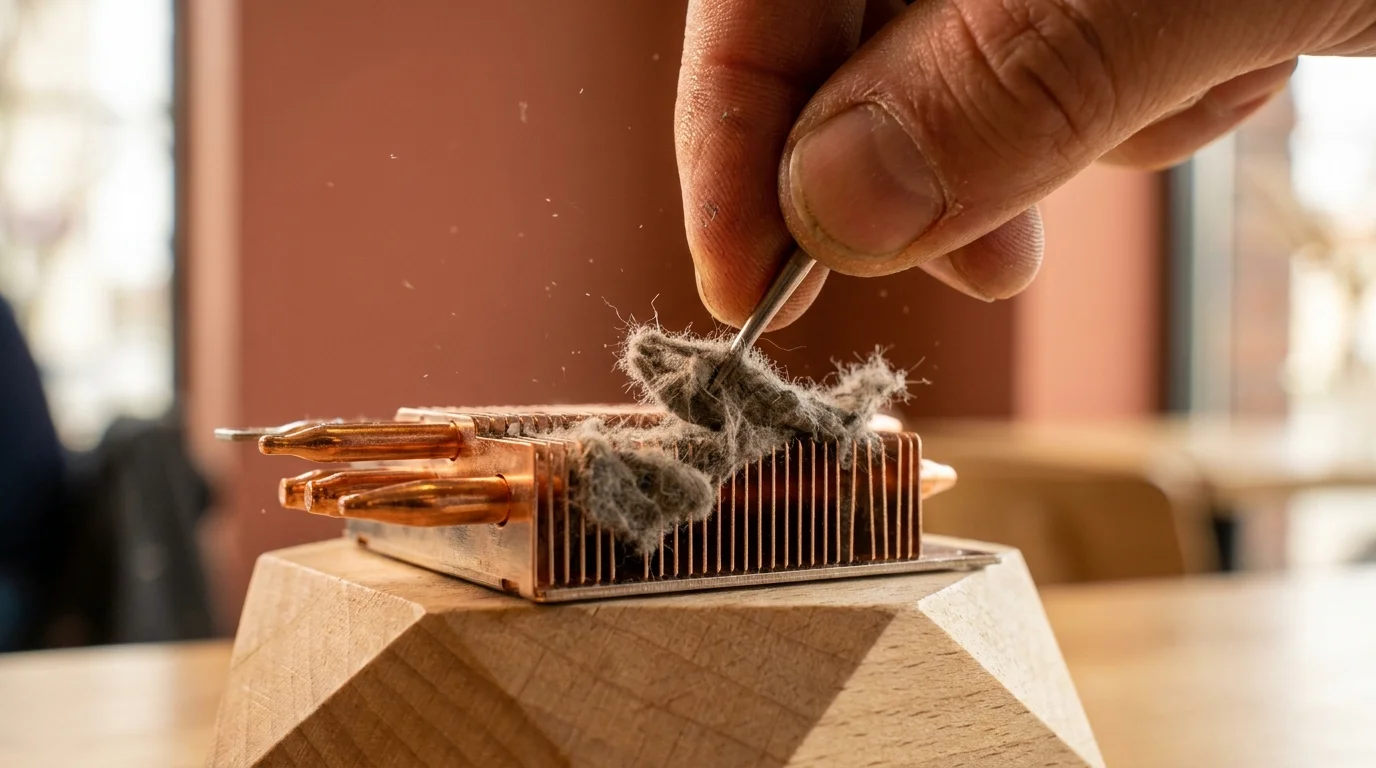
When you finally release the clips of the outer cover plates, expecting to see a light layer of household sediment, reality reveals a far more insidious culprit. Buried deep within the structural intake tunnels sit **thick grey felt-like lint clumps** choking shiny copper radiator fins, forming a dense, impenetrable wool sweater that suffocates the hardware from within.
The Optical Illusion of Exterior Cleaning
Most console owners treat hardware maintenance like cleaning a kitchen counter: wipe the exterior plates with a microfiber towel, sweep a vacuum attachment lazily across the outer louvers, and assume the job is done. In reality, external airflow passes through a tortuous labyrinth before it ever reaches the core silicon. The exterior intake grilles are merely a cosmetic screen, leaving the true thermal bottleneck completely untouched.
Treating this cooling assembly like an ordinary fan is a mistake; **it acts like a lung** pulling hundreds of cubic feet of unfiltered room air through tight architectural channels every single week. When you run a household vacuum over the outer vents without opening the casing, the suction pulls against mechanical resistance, often packing loose pet hair and micro-fibers even tighter into the heatsink crevices instead of extracting them.
Modern console architecture pairs an ultra-dense aluminum and copper radiator stack with a recessed power supply unit positioned directly beneath the main airflow channel. When fine airborne debris bypasses the primary fan blades, it encounters the radiator’s micro-fins, dropping velocity and sticking to the metal like silt on a riverbed. Over months of regular use, that silt weaves itself into an airtight felt gasket that traps blistering exhaust heat directly against the power supply housing.
- Holafly eSIM profiles strip cellular data connection traps before clearing international airport gates
- Apple HomePod mini speakers require deep Siri history resets halting muffled room audio recordings
- Google Pixel 9 Pro cameras strip muddy photo noise after disabling aggressive sharpening toggles
- Hotel Wi-Fi networks expose sensitive mobile passwords behind sluggish unencrypted login portals
- Uplift V2 standing desks force painful neck stiffness without raised monitor arm mounts
The January Workshop Influx
Marcus Vance, a thirty-eight-year-old micro-soldering technician and hardware restoration specialist in Columbus, Ohio, watches his repair bench overflow every year between late December and early February. “People spend seventy straight hours playing graphic-heavy holiday releases in closed rooms with the home heating running around the clock,” Marcus explains while prying a stubborn plastic casing apart under a bright halo lamp. “They bring in machines that turn off after precisely twelve minutes of gameplay, completely convinced the main processor has died.”
In ninety percent of these emergency bench visits, Marcus doesn’t touch a soldering iron. Instead, he reaches for a non-conductive probe and a soft painter’s brush to extract what looks like a compressed dryer sheet lodged between the primary heatsink array and the power supply ventilation ports. The console’s emergency thermal sensors shut down power automatically the second localized temperatures spike past safe operating limits, saving the motherboard from destruction while leaving the user completely baffled.
Thermal Profiles Across Different Living Spaces
No two living spaces deposit the same environmental tax on internal electronics. Understanding your room’s specific footprint allows you to build a maintenance rhythm that keeps hardware alive for years without unexpected shutdowns.
The Low-Clearance Carpet Setup: Resting an active console on a carpeted floor or low shelf turns the lower chassis into an active street sweeper. Carpets continuously shed synthetic micro-shears that carry a minor electrostatic charge, allowing them to bind instantly to metallic radiator fins. If your console sits within twelve inches of a rug, cleanings must occur three times more frequently than elevated setups.
The Multi-Pet Household: Animal dander contains natural lipid oils that coat incoming air particles. When cat or dog hair hits the internal radiator array, these oils cause fibers to mat together into waterproof webs that cannot be dislodged with passive airflow. **Pet dander bonds with dust** to create structural felting that entirely chokes fine copper radiator fins.
The Closed Entertainment Credenza: Placing hardware inside a cabinet with a solid back panel creates an acoustic and thermal feedback loop. The fan draws in its own superheated exhaust, compounding thermal expansion and causing the internal heatsink to hit critical temperatures twice as fast under ordinary processing loads.
The Surgical De-Clogging Protocol
Restoring whisper-quiet operation doesn’t require a full teardown down to the bare silicon. It requires knowing the exact structural locations where manufacturer engineers designed dust to settle, and using the proper physical tools to lift it out without spinning fan bearings dry or generating static electricity.
Never point an electric duster directly into the fan without physically stabilizing the blades. Spinning the fan impeller mechanically with compressed air can induce a back-voltage into the fan controller chip, frying the fan header on the motherboard before you even power the unit back on.
- Step 1: Release the Side Casings: Disconnect all cables and lay the unit on a flat, anti-static work surface. Gently lift the top rear corner of each side panel outward and slide it down toward the base until the internal tabs disengage with a soft click.
- Step 2: Inspect the Triangular Dust Traps: Locate the two recessed triangular capture ports built directly into the inner plastic skeleton. These catchers are engineered specifically to trap migrating particles before they wedge into the copper fins.
- Step 3: Secure the Fan Assembly: Insert a soft plastic spudger or non-marring wooden chopstick through the intake grille to prevent the impeller from free-spinning while cleaning.
- Step 4: The Soft-Brush Sweeping Technique: Use a fine natural-hair or ESD-safe nylon brush to sweep along the radiator intake face, agitating the matted lint until it breaks apart into liftable clusters.
- Step 5: Vacuum the Secondary Catchers: Place a narrow, non-static plastic nozzle directly against the dedicated vacuum catch holes to extract the dislodged lint without touching the circuitry.
- Step 6: Clear the Internal Power Supply Vents: Direct a focused beam of light down the narrow channel adjacent to the fan housing. Use a long, soft-bristle detailing brush to gently sweep the perforated metal intake that feeds the power supply, lifting away the felt layer resting across the vent holes.
The Tactical Toolkit: Equip yourself with a T8 Security Torx driver (with the hollow center tip), a high-density natural bristle artist brush (size 6 or 8 round), a non-conductive plastic spudger, and a low-powered handheld vacuum featuring a non-static rubberized tip. Avoid metal dental picks, compressed gas cans held upside-down, or industrial shop vacuums that create intense static friction.
Restoring the Quiet Architecture of Play
Modern gaming hardware is an incredible feat of micro-engineering, condensing desktop-tier computing power into a sculptural form that rests quietly beneath our home televisions. Yet beneath that clean aesthetic sits an ancient physical reality: heat transfer requires unobstructed surface area, and ambient air is never entirely clean.
When you take twenty minutes twice a year to clear the copper fins and clear out the internal traps, you are doing more than simply lowering decibel levels. You are protecting internal voltage regulators, preserving solder joints against intense thermal cycling, and restoring the machine’s intended balance. In the quiet that follows, the distraction of mechanical struggle fades away, leaving only the world on screen.
“Console longevity is rarely about silicon lottery; it is almost entirely determined by how freely cool air can kiss copper.” — Marcus Vance, Hardware Restoration Specialist
| Key Point | Detail | Added Value for the Reader |
|---|---|---|
| Exterior Vacuuming Myth | Surface suction pulls loose debris tighter against internal radiator micro-fins. | Prevents you from worsening thermal blockages through ineffective habits. |
| Dedicated Catch Ports | Factory-molded triangular ports trap migrating debris before the heatsink. | Pinpoints the precise target locations for safe household vacuum extraction. |
| Fan Blade Stabilization | Unrestricted airflow through powered-down fans generates damaging electrical feedback. | Protects your mainboard fan controller from permanent static voltage blowouts. |
| Power Supply Choke | Secondary lint blankets over power supply vents trigger unannounced black-screen shutoffs. | Explains the mystery behind sudden console shutdowns without thermal warnings. |
Frequently Asked Questions
Why does my console shut off without an overheating warning?
A sudden shutoff without an on-screen warning usually points to the power supply unit overheating rather than the main processor. When the small perforated intake holes feeding the power supply are blanketed in dust, its safety switch trips instantly to prevent an electrical fire.Is canned compressed air safe to use on the heatsink?
Only if used judiciously and in short bursts. Blasting canned air directly into an open chassis often drives heavy dust mats deeper between the copper radiator fins or sprays liquid propellant residue onto electrical components.How often should I clear out the internal radiator?
In a standard elevated setup without pets, clearing the primary vents every six months is plenty. If your console sits near the floor, in an enclosed cabinet, or in a home with multiple shedding pets, perform this check every three months.Does removing the outer white plates void my hardware warranty?
No. The outer covers are specifically designed to be removed by the user to access the secondary storage expansion slot and the factory-designed dust collection ports.Why is the fan still loud after cleaning the exterior grilles?
Cleaning external grilles leaves the dense felt layer trapped against the internal copper heatsink fins completely untouched. The fan controller continues to run at maximum speed because heat cannot transfer away from the processor.