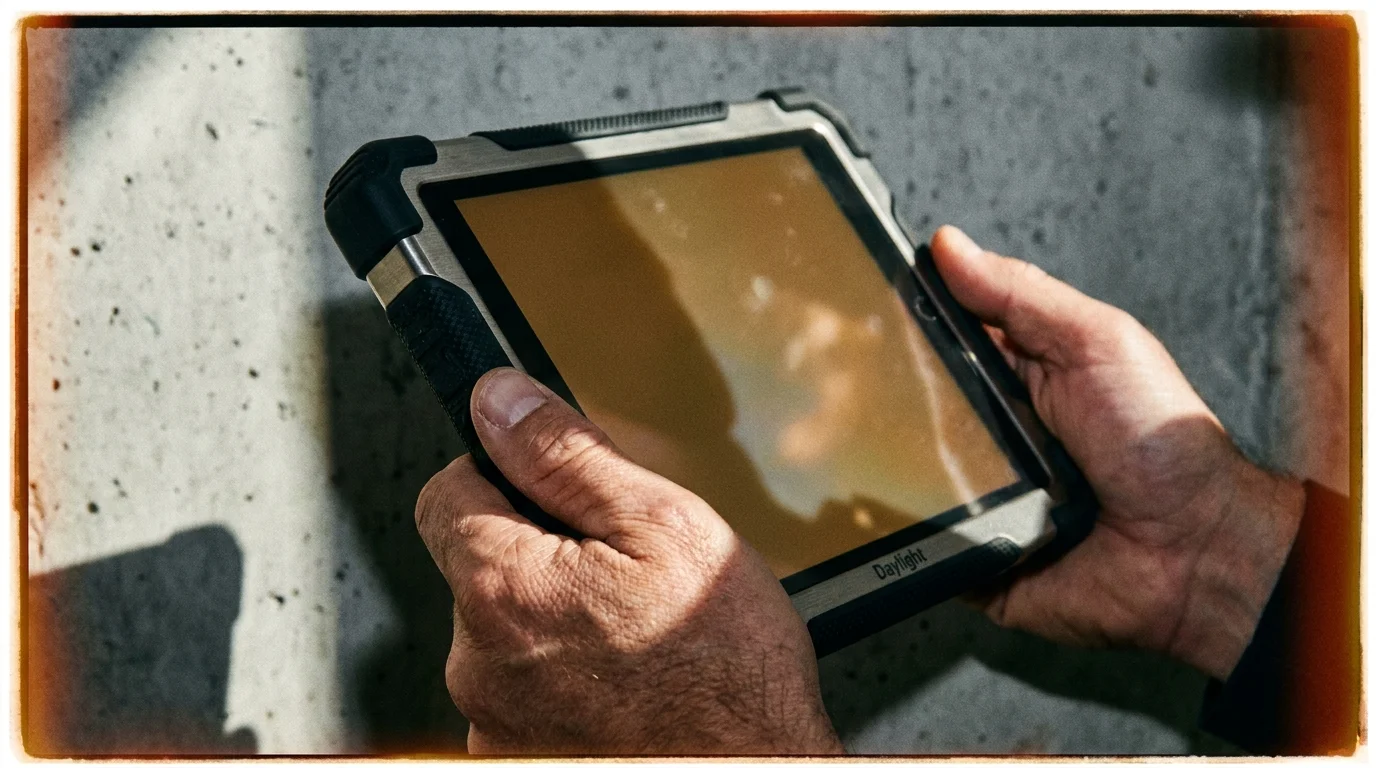
Step outside on a crisp morning in Palo Alto, sit beneath the dappled canopy of an oak tree, and try pulling your standard tablet from your bag. You already know what happens next. The screen turns into an expensive pocket mirror, fighting the sun with blinding bursts of peak nits, throwing harsh specular highlights into your pupils while cooking its internal battery to keep up.
Now imagine resting your palm on something entirely unfamiliar. You look down at a matte amber screen reflecting soft ambient sunlight without a single speck of glossy surface glare. It feels less like staring into an open microwave and more like resting your gaze on a freshly printed paperback novel that mysteriously moves at sixty frames per second.
For fifteen years, the consumer electronics industry has treated personal computing like an arms race of sheer optical violence. We were taught to demand richer contrasts, deeper blacks, and retina-melting peak brightness that leaves our nervous systems humming with synthetic daytime long after midnight. But a quiet insurrection has begun brewing in California workshops, turning that entire doctrine inside out.
The Daylight Computer tablet has suddenly become the most coveted slate in tech corridors, sparked not by what it adds, but by what it bravely strips away. Built by industry defectors who spent decades engineering the very devices that drained our focus, this stealth hardware project offers an audacious proposition: personal technology should behave like calm morning paper, not an aggressive lantern.
The Illusion of the Luminescent Mirror
Every major flagship tablet on the shelf right now relies on an emissive panel. Whether it is an OLED matrix or a dense Mini-LED backplane, the fundamental physics remain identical: tiny digital diodes shoot coherent blue-heavy light directly into your retinas. When ambient sunlight fights back, engineers don’t rethink the medium; they simply crank up the optical torch until your battery drains and your temples throb with tension.
Daylight Computer abandoned that entire philosophy to build LivePaper. Instead of trapping you behind polished, chemically tempered glass that catches every ceiling fixture, their display architecture relies on a reflective, transflective liquid crystal foundation. It does not blast light through your eyes to make text legible. Instead, it invites the ambient room illumination to wash across the surface, turning natural light into its primary power source.
- Instagram background updates quietly switch microphone toggles leaving phones with drained battery bars
- Samsung Galaxy vibration alerts trigger phantom thigh twitches even while resting across desks
- Google Pixel 8 Pro firmware forces sudden speed limits masking scorching chassis heat
- Verizon cellular service traps millions of smartphones on SOS mode during nationwide blackouts
- iPhone 13 battery replacements reverse sluggish app stutter saving owners costly device upgrades
Traditional E-ink tried this years ago, but it left readers trapped behind frustrating refresh lag and ghosted keystrokes that felt like typing through wet cement. LivePaper shatters that limitation by running at a smooth sixty hertz. You can write, scroll fluidly, and browse documentation with zero perceptible latency, all while looking at a physical medium that refuses to flicker or emit a single nanometer of disruptive short-wavelength blue light.
The Defector’s Blueprint: How LivePaper Came to Life
Julian Vance, a 34-year-old embedded systems engineer who spent seven years tuning display pipelines for premier hardware makers in Cupertino, found himself unable to work past mid-afternoon due to debilitating optical fatigue. After stepping away from enterprise hardware to join Daylight’s small engineering cell, he realized the industry’s obsession with saturated color had backed computing into an evolutionary corner.
Vance and his colleagues realized that by eliminating the rigid color filter array and polarizers that choke traditional displays, they could allow natural light to strike a specialized reflective substrate and bounce right back into the reader’s eye. When evening falls, the tablet does not flip on an icy blue LED array. Instead, it engages a customized, purely warm amber front-light designed to emulate the soft glow of a bedside candle, operating completely outside the circadian-disrupting spectrum.
Choosing Your Ambient Workflow
Shifting away from an emissive screen requires recalibrating how you interact with your digital workspace. The Daylight tablet does not attempt to be a portable television; it is designed from the ground up as a focused thinking machine. Here is how different disciplines are adapting to its tactile landscape:
For the Deep-Work Writer and Researcher
If you spend your days parsing dense PDFs, writing long-form manuscripts, or reviewing contracts, your eyes take the brunt of emissive glare. With LivePaper, reading outside on a sunny patio actually improves legibility. The brighter the sun beats down, the crisper the charcoal typography appears against the warm backdrop, transforming bright outdoor spaces into productive offices.
For the Distraction-Free Developer
Engineers often find themselves squinting at terminal windows late into the night, their circadian rhythms battered by high-contrast IDEs. The Daylight tablet runs a customized, whisper-quiet Android fork stripped of dopamine traps. Terminal sessions render in razor-sharp monochrome amber, providing a fluid coding environment that eliminates the chronic eye strain common to midnight debugging sessions.
For the Mindful Student and Sketch Artist
Emissive tablets often feel like drawing on a greasy sheet of bathroom tile. Daylight pairs its low-glare surface with custom-tuned micro-texture, giving stylus strokes the soft tactile drag of a mechanical pencil against thick parchment. Note-taking becomes a visceral, physical act rather than an exercise in sliding plastic against slick glass.
The Low-Stimulus Reset Protocol
Integrating a reflective tablet into your routine works best when treated as a deliberate sensory reset. To build an environment that honors your attention span and protects your vision, apply these minimalist adjustments:
- Leverage Natural Geometry: Position your desk so ambient window light washes across your workspace from the side, allowing the reflective panel to catch daylight without casting body shadows across your work surface.
- Banish Evening Blue Exposure: Set the amber front-light to kick in automatically at sunset, keeping the illumination intensity just high enough to read comfortably without competing against the ambient dimness of your room.
- Strip Away Notification Clutter: Keep the device isolated to deep-work applications, utilizing its distraction-free operating system to read documentation, journal, or draft prose without pop-up pings tearing through your attention.
The Tactical Daylight Toolkit: To maximize the benefits of reflective computing, pair your device with an ambient task lamp calibrated between 1800K and 2200K color temperature, maintain an 18-to-24-inch viewing distance, and run daily work sprints in rooms featuring at least 300 lux of indirect natural sunlight.
The Gentle Rebellion Against Glowing Glass
For more than a decade, consumer technology convinced us that progress had to look like brighter, glossier, louder rectangles. We accepted the dry eyes, the evening headaches, and the splintered attention spans as the inevitable tax of modern connectivity. We simply turned the brightness slider down a notch and kept squinting through the digital glare.
The sudden rise of Daylight Computer proves that our collective patience with over-engineered glass has finally fractured. Real luxury in personal hardware no longer means stuffing more saturated pixels into a panel. True technological elegance is a screen that respects your physical biology, leaves your nervous system calm, and lets you do your best work without asking you to stare down a flashlight.
Technology should settle into our physical world like natural paper, quiet, enduring, and entirely respectful of human biology.
| Key Point | Detail | Added Value for the Reader |
|---|---|---|
| Display Architecture | 60Hz LivePaper reflective LCD bypassing emissive backlights. | Offers paper-like reading comfort with the fluid frame rate needed for modern productivity. |
| Optical Health | Zero blue-light emission with ambient reflection and warm amber front-lighting. | Prevents digital eye fatigue and preserves natural melatonin production during evening sessions. |
| Outdoor Usability | Reflective transflective panel using ambient sunlight for contrast. | Completely eliminates sunny glare, turning outdoor parks and patios into practical workspaces. |
| Operating Focus | Customized minimalist Android OS stripped of notification bloat. | Restores deep, uninterrupted focus by removing app-store dopamine traps. |
Frequently Asked Questions
Does the Daylight Computer tablet support standard Android apps?
Yes. The device runs a custom, low-distraction operating system built atop Android, allowing you to install essential reading, writing, and note-taking applications while presenting them in a serene, distraction-free monochrome aesthetic.How is LivePaper different from standard E-ink readers?
While traditional E-ink tablets max out at sluggish refresh rates that cause typing latency and visible screen ghosting, LivePaper operates at a fluid sixty hertz, making web navigation, typing, and stylus input completely seamless.Can I use the tablet in a completely dark room?
Yes. The display includes an integrated, pure amber front-light designed to illuminate the panel gently from the front, completely avoiding the harsh, direct-to-eye blue wavelengths found in typical tablet screens.How does battery life compare to standard consumer tablets?
Because reflective displays utilize ambient environment lighting rather than driving power-hungry emissive backlights throughout the day, battery consumption drops dramatically during outdoor and well-lit indoor sessions.Is the screen textured for handwriting?
Yes. The surface features an anti-glare, matte finish engineered with subtle mechanical resistance, mimicking the natural tactile friction of dragging a pencil across fine stationery.