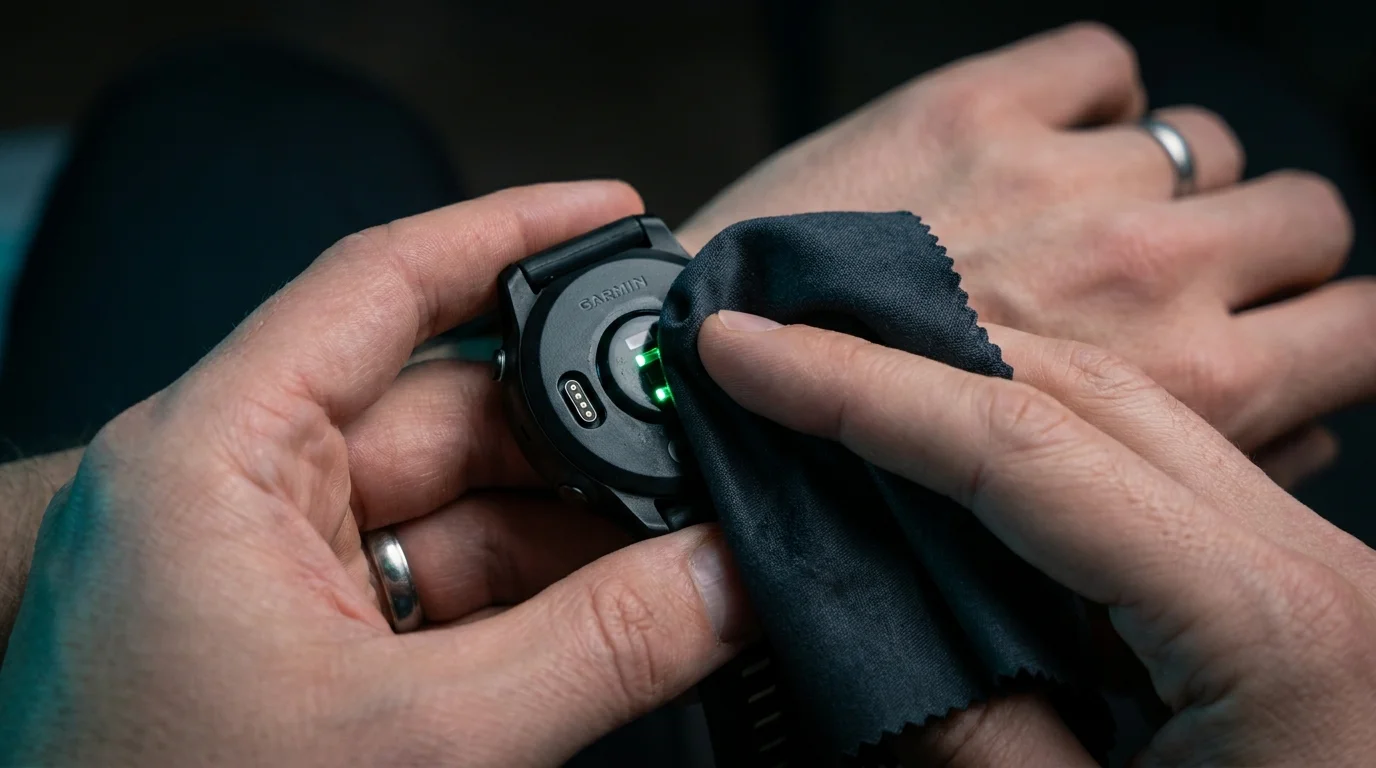
The dawn air sits heavy at forty-two degrees Fahrenheit, smelling faintly of damp pavement and pine needles. You step out onto the asphalt, tug your sleeve past the bezel of your Garmin Forerunner, and press start. Your breathing remains calm, rhythmic, barely misting in the cold morning light, yet three minutes into an easy warmup stride, your watch vibrates with a frantic warning: your heart rate has supposedly rocketed to 186 beats per minute.
You touch two fingers to the side of your neck. The pulse there is gentle, steady, humming along at barely 125 beats. Your legs feel light, your chest relaxed, but the digital display insists you are redlining in maximum aerobic distress. It is an unnerving mismatch that turns an otherwise peaceful morning routine into a frustrating guessing game of cadence lock and faulty data.
We tend to blame internal firmware, outdated satellite connections, or degraded lithium cells whenever our wrist hardware misbehaves. Yet the culprit behind these wild, jagged metrics is rarely an electronic failure. Most often, the problem lives on the physical barrier between your pulse and the optical sensor: a micro-thin sheen of dried sebum, dried sweat salts, and an accidental positioning error that turns your sports watch into a broken mirror.
The Prism Effect: Why Photons Stumble Over Skin Oils
Your watch does not listen for your heartbeat; it watches it. Through a process known as photoplethysmography, tiny green light-emitting diodes flash hundreds of times per second into your epidermis, while central photodiodes measure the minute shifts in light absorption as blood pulses through capillary beds. When that optical window is immaculate, the light enters clean and bounces back with mathematical precision.
Over several days of wear, skin oils and sweat salts build a microscopic film across the curved glass dome beneath the case. When those green photons hit that oily barrier, they undergo refraction—scattering at erratic angles like headlamps shining through a grease-smeared windshield on a rainy highway. Instead of reading the subtle ebb and flow of hemoglobin, the sensors capture light bouncing off your shifting skin surface.
The sensor mistakes this optical scatter for high-frequency motion. Instead of tracking your cardiovascular system, the sensor locks onto your footstrike cadence, jumping suddenly from a relaxed pace to match your exact running cadence of 170 to 185 steps per minute. A simple physical smudge effectively hijacks complex digital algorithms.
- OnePlus SuperVOOC bricks generate scorching surface warmth during rapid overnight battery top-ups
- YubiKey security keys block predatory SIM swap scams replacing vulnerable SMS login codes
- Apple AirPods Max stop choppy audio dropouts after resetting congested network caches
- OLED monitor screens stop gritty evening eye burn after shifting refresh rate toggles
- WhatsApp chat backups clog internal smartphone memory with endless bloated video clutter
The Bench Technician’s Field Revelation
Marcus Vance, a forty-one-year-old audio calibration technician and masters marathoner from Boulder, spent months wrestling with unexpected pulse spikes on his Garmin Forerunner 265. Every Tuesday during interval work, his heart rate graph resembled a jagged mountain range, showing impossible vertical leaps during low-intensity jog recoveries. After sending diagnostic logs to customer forums without resolution, Marcus examined the watch under an illuminated bench magnifier he used for soldering circuit boards.
What looked clean to the naked eye was actually coated in a hard, baked-on crust of mineral salts from evaporated sweat, locked in place by body oil and sunblock residue. The optical sensor was firing through an accidental frosted lens. After wiping the domed sensor down with pure isopropyl alcohol and a clean lens cloth, and sliding the band back two fingers away from his wrist bone, his subsequent ten-mile tempo run traced a pristine, smooth line that tracked his manual pulse checks within a single beat.
Matching Your Setup to Your Routine
Every wrist moves differently, and environmental demands change the optical connection between your flesh and your watch glass. Adjusting your habits based on how you train restores accuracy across the board.
For the Cold-Weather Runner
Cold mornings trigger peripheral vasoconstriction, pulling warm blood away from your extremities toward your core. This reduces capillary volume at the wrist, giving the optical sensor a much weaker baseline signal. If your sensor glass has even a faint grease smudge, the watch will almost certainly default to cadence lock. Keep the sensor polished clean and warm your arms with light gloves or sleeves for ten minutes before pressing start.
For the Sweaty High-Cadence Strider
If you sweat profusely or apply sport sunscreen, an emulsion of oils and lotion forms beneath the watch chassis within twenty minutes of hard effort. This liquid film acts as an unpredictable optical prism. Switch to an elastic nylon loop band instead of rigid silicone; nylon maintains a uniform tension without creating pressure points, keeping the clean glass pinned securely against the skin without sliding through perspiration.
For the Round-the-Clock Health Tracker
Wearing your watch continuously for sleep tracking and stress monitoring creates a slow buildup of dead skin cells and natural sebum. This grime settles directly in the crevice around the optical sensor module. A weekly dry wipe is not enough to stop gradual signal degradation; consistent, gentle hygiene is required to keep nighttime heart rate variability readings meaningful.
The Two-Finger Anchor and Microfiber Protocol
Fixing erratic readings does not require new hardware or complex software rollbacks. It comes down to two repeatable physical habits that create an ideal optical window.
First is the placement rule. Most runners wear their watch far too close to the hand, resting directly on the prominent head of the ulna—the knobby wrist bone. When your wrist bends, this bone levers the watch away from the skin, breaking the seal and letting ambient light pollute the sensors.
- Measure Two Finger-Widths: Lay your index and middle fingers flat across your forearm, just behind the bony bump of your wrist. Slide your watch so the chassis sits squarely behind your second finger, higher up the fleshy section of your forearm.
- Check the Tension: Tighten the band so the watch cannot slide, but avoid choking your circulation. If you pull gently on the strap, the skin beneath should move with the watch without daylight creeping into the optical chamber.
- The Pre-Run Microfiber Sweep: Keep a dedicated optical microfiber cloth by your door or inside your running belt. Before strapping in, give the sensor glass a firm, circular buffing for five seconds to strip away yesterday’s skin lipids.
- The Post-Workout Water Rinse: After training, run the watch face-down under lukewarm tap water for ten seconds. Gently wipe the sensor with a drop of mild dish soap once a week to dissolve hydrophobic body oils, then dry it thoroughly before putting it back on.
The Tactical Accuracy Toolkit
- Optical Microfiber: 250+ GSM lint-free lens cloth kept strictly dry.
- Placement Index: 1.5 to 2 inches (two adult finger widths) proximal to the ulnar prominence.
- Cleaning Agent: Lukewarm water and diluted pH-neutral soap (never use harsh acetone or abrasive cleansers).
- Band Material: Hook-and-loop breathable weave for infinite micro-adjustments during temperature swings.
A Clear Lens on Personal Effort
We lean on personal technology to reflect our true physical effort, hoping numbers on a glass face will validate the unseen work our lungs and muscles perform in the quiet hours. When those numbers dance erratically, our connection to our own bodies feels strangely disrupted, trading internal intuition for digital anxiety.
Taking thirty seconds to clear the optical path and settle the strap into its natural cradle is a grounding ritual. It removes the static between your effort and your data. Once the glass is clean, the watch stops arguing with your senses, leaving you free to listen to your stride, trust your breathing, and run entirely unburdened.
The sharpest sensor in the world is only as honest as the window you let it see through.
| Adjustment Factor | Standard Habit | The Precision Method |
|---|---|---|
| Sensor Maintenance | Wiped quickly on a sweaty t-shirt before running | Dry microfiber circular buff followed by weekly warm water rinse |
| Chassis Placement | Resting directly over the wrist bone articulation | Two fingers back on the flat, vascular bed of the lower forearm |
| Band Snugness | Loose enough to shift during arm drive | Firm, zero-gap contact that moves skin without pinching blood vessels |
Frequently Asked Questions
Can I clean my Garmin sensor with hand sanitizer or rubbing alcohol?
Avoid frequent use of high-concentration alcohol or hand sanitizers on your watch. While isopropyl clears grease instantly, repeated contact can degrade the water-resistant rubber gaskets and weaken the chemical coating on the optical polycarbonate dome. Stick to lukewarm water and mild dish soap.Why does my heart rate spike only during the first mile of a workout?
In early miles, your skin is typically cool and dry, and blood flow to your skin capillaries is restricted. Until you produce a tiny amount of warmth and blood volume rises, an oily or loose sensor easily locks onto the mechanical thud of your footsteps instead of your pulse.Does body hair cause the same issue as skin oils?
Dense hair lifts the optical lens away from the skin, allowing external daylight to leak into the photodiode. While skin oils refract the watch’s own green light, hair creates physical gaps. Wearing the watch slightly snugger or moving it slightly higher up the arm usually bypasses thicker hair patches.Why do chest straps never have this problem?
Chest straps measure electrical voltage changes across heart contractions (electrocardiography) rather than optical blood volume changes. They do not rely on light beams, meaning oils and optical smudges cannot distort their readings.Will a screen protector over the sensor glass stop the grease?
Never apply a screen protector over the heart rate sensor dome on the back of your watch. The extra adhesive and plastic layers introduce multiple optical interfaces that severely distort green light transmission, making erratic heart rate spikes far worse.